Every milestone verified live. Time with the tool is still being recorded, so no time saving is claimed.
League Desk
A working operations notebook for a part-time league service role, built on a home Windows domain that syncs to Microsoft Entra ID and is managed by Intune. It tracks league schedules, a work queue, follow-ups and a time clock, and doubles as hands-on proof of Active Directory, SQL Server, ServiceNow, Entra ID and Intune skills.
Design, lab build, app, integrations, identity tenant, reporting and testing.
Windows infrastructure, identity and device management, SQL Server, and a service desk integration.
Project Overview
Purpose: League Desk runs on a home Windows domain that syncs to Microsoft Entra ID and is managed by Intune. It keeps each league's schedule, the work due before its next night, the questions that come up each week and the hours spent, in one place.
| Part | What it is |
|---|---|
| Hyper-V lab | Four servers (domain controller, SQL Server, application server, kiosk) on one isolated lab network, built and rebuilt from PowerShell scripts with Pester tests. |
| Node and Express app | Runs as a Windows service, reads and writes SQL Server over Kerberos with a least-privilege account, and holds 15 league schedules, a work queue, follow-ups and a time clock. |
| ServiceNow integration | An Escalate action creates an incident through the Table API, retries safely and reads the state back. A five-article knowledge base is published. |
| Microsoft 365 tenant | Cloud Sync from Active Directory, Intune compliance on Windows, macOS and iOS (three devices enrolled and verified Compliant), and the app reached from a phone through Entra Application Proxy behind MFA. |
| Power BI dashboard | Built on five read-only SQL views that show league aliases instead of names. |
| Quality gates | 278 Node tests, 449 Pester tests and a repository verifier, all green, plus a live check for every milestone. |
Baseline: A baseline of 6 hours 45 minutes a week is recorded. Any effect on that time is measured later and is not claimed here.
Architecture
A phone request signs in to Entra and meets MFA, passes the Application Proxy, and reaches the app server through the connector, which reads SQL Server with Kerberos. A MacBook reached the same app through a WireGuard tunnel to the host, and ServiceNow is called only when an escalation is made. Power BI Desktop on the host reads five read-only views of the same SQL Server through a read-only Windows account.
Skills Demonstrated
Every row points to something that was checked: a script, a test run or a captured screenshot.
| Skill area | What was done | Evidence |
|---|---|---|
| Active Directory and Group Policy | Built a domain with OUs, groups, delegated password reset and kiosk lockdown GPOs; later added a UPN suffix and a GPO for Intune enrollment. | Live state check passes; delegated reset and lockdown tested; GPO values read back. |
| PowerShell automation | Scripted VM builds, directory setup, backups, a credential store, firewall rules and a Graph report, all with a preview mode and exit codes. | 449 Pester tests whose stubs enforce real parameter sets; a repository verifier. |
| SQL Server and SSRS | Pinned schema, stored procedures, Agent jobs, a least-privilege role and a Weekly Recap report. | Verifier scripts (14, 21 and 46 checks); backup and restore drill. |
| Windows services and app hosting | Node app as a Windows service with delayed start, crash recovery, a scoped firewall rule and Kerberos to SQL. | Crash recovery under 12 seconds; survives a restart with nobody signed in. |
| ServiceNow administration and REST | Developer instance, integration user, scoped app, a Table API client with timeouts, a circuit breaker and idempotent retries, and a knowledge base. | Live incident created, retried and read back; five published articles. |
| Entra ID and Cloud Sync | Verified a subdomain with one DNS record, synced by OU, kept admins out of the cloud and added device sync. | Agent healthy; provision-on-demand results; scoping filters captured. |
| Intune | Apple MDM push certificate, compliance policies for Windows, macOS and iOS, and enrollment of three devices. | All three devices showed Compliant in the Intune device list. |
| Conditional Access and Application Proxy | Published the app through a connector, restricted it to one group and required MFA. | Phone sign-in on cellular; the sign-in log listed the policy with Success. |
| Microsoft Graph | A read-only device health report with delegated consent and minimal scopes. | Two clean live runs; report with no personal identifiers. |
| Power BI and reporting | Five read-only SQL views that show league aliases instead of names and carry no free text or contacts, read by Power BI Desktop through a least-privilege Windows identity; a one-page dashboard. | 26 live checks passed; the dashboard export was checked for league names before it was used. |
Usage
How the app is used week to week.
- Nightly work. After a league bowls, a nightly job creates the work due before its next night: enter, print (with each league's copy count), email or verify.
- One Work Queue. All open work sits on one list, overdue first, with the days late written out. Anything unfinished stays on the list.
- Follow-ups. Questions that come up, such as bad handwriting, missing sheets or rule queries, are logged and tracked until resolved. One can be escalated to ServiceNow with a single button.
- Time clock. A clock records when work starts and ends. Weekly totals sit beside the 6 hour 45 minute baseline.
- Access. The app is reached from a laptop over a private tunnel, or from a phone through the published address behind MFA.
- Dashboard. A read-only Power BI dashboard shows weekly hours, open work, follow-ups and printing workload.
Preview
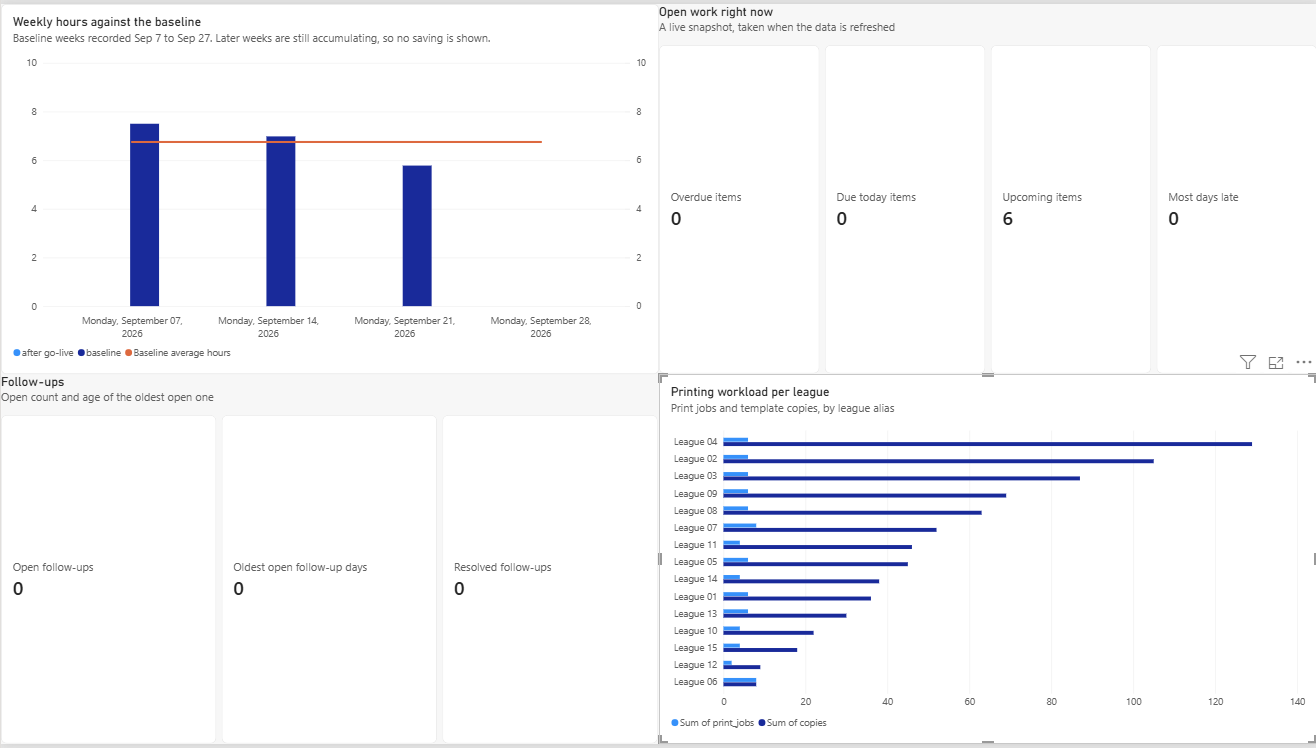
Usage figures from the tool (hours a week, items closed, days late) will be added once there are enough weeks of clock-ins.
Context: The Problem and the Goals
The work is real and weekly: roughly 6 hours 45 minutes a week (a three-week average from September 2026) spent preparing score sheets and standings, chasing follow-ups and tracking which league needs what before its next night. The same project is also the hands-on evidence for the skills job applications ask about.
| Goal | Includes |
|---|---|
| What the tool must do |
|
| What the build must prove |
|
Data boundary: The system stores only the owner's own schedules, notes, tasks, follow-ups, timers and officer contacts. It holds no participant names, scores or exports from any scoring service.
Tools + Build
Hyper-VWindows Server 2025Active DirectoryGroup PolicyPowerShellPesterSQL Server 2022SSRSNode.jsExpressKerberosWindows ServicesMicrosoft Entra IDEntra Cloud SyncIntuneConditional AccessApplication ProxyMicrosoft GraphServiceNow Table APIPower BIWireGuard